- The default display manager in
RHEL 9is calledGDM(GNOME Display Manager)
Linux Directory Structure:
- Linux files are organized logically in a hierarchy for ease of administration and recognition. This organization is maintained in hundreds of directories located in larger containers called file systems. Red Hat Enterprise Linux follows the Filesystem Hierarchy Standard (FHS) for file organization, which describes names, locations, and permissions for many file types and directories.
- The Linux directory structure is analogous to an inverted tree, where the top of the tree is the root of the directory, tree branches are subdirectories, and leaves are files.
- Path example:
/etc/rc.d/init.d/README- The
etcdirectory is located under/-> here/is the parent andetcis the child. rc.d(child)is located underetc(parent).init.d(child)is located underrc.d(parent).README(leaf)is located underinit.d(parent).
- The
- ==SUB-DIRECTORY:== A directory that has a parent directory.
Note
The root directory has no parent, and the lowest level subdirectory has no child.
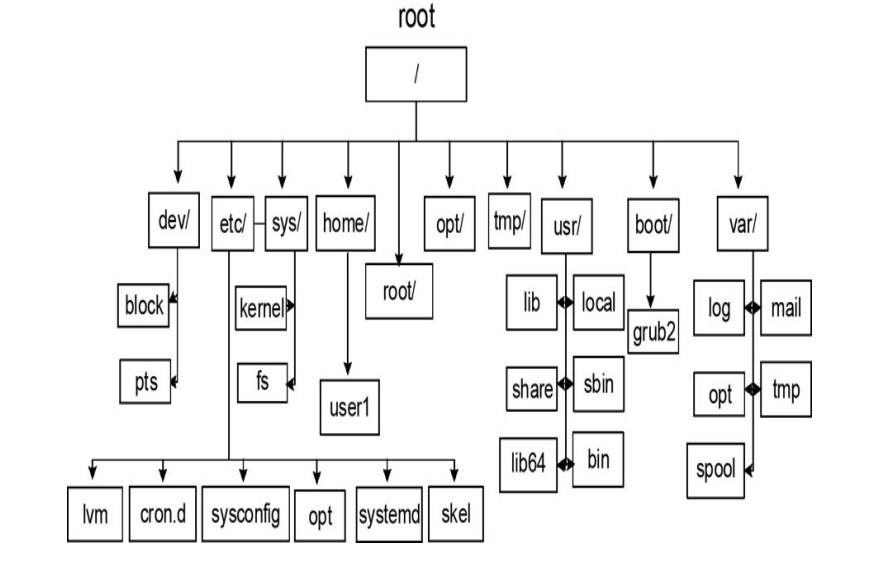
- Some of the directories hold static info and dynamic info. Static directories normally contain commands, configuration files, library routines, kernel files, device files, etc., and dynamic directories contain log files, status files, temporary files, etc.
File system categories:
There are 3 file systems supported in RHEL:
Disk based:They are created on the physical media such as hard drive/ SSDs/ USB drive.Network Based:They are disk based file systems, shared over the network for remote access.Memory Based:They are virtual file systems. Created automatically during the start up and destroyed when the system goes down.
Note
During RHEL installation 2 file systems are being created - root and boot file system.
root file system(/) - Disk based:
- It is the top level file system in the FHS.
- Some of the key directories that it contains are -
/etcExtended Text Configuration : It holds config files and some common sub directories like ->systemdsysconfiglvmskel
/root:It is the default home directory.
boot file system - Disk based:
- The boot file system contains the Linux kernel, boot support files, and boot configuration files.
Home directory:
- It is designed to store user home directories and other user contents.
The optional directory(opt):
- This directory can be used to hold additional software that may need to be installed on the system. A subdirectory is created for each installed software.
The Unix System Resource directory(/usr):
/usr/bin- This binary dir contains crucial user executable commands./usr/sbin- This contains commands those are not intended for execution by normal users. Though they can run but they require root privileges. This directory is not included in the default search path for normal users because of the nature of data it holds./usr/lib- The library directories contain shared library routines required by many commands and programs located in the /usr/bin and /usr/sbin directories, as well as by the kernel and other applications and programs for their successful installation and operation. It also stores system initialization and service management programs./usr/lib64- The library directories contain 64 bit shared library routines required by many commands and programs located in the /usr/bin and /usr/sbin directories./usr/include- Contains header files C language./usr/local- This directory serves as a system administrator repository for storing commands and tools downloaded from the web, developed in-house, or obtained elsewhere./usr/local/bin- Holds executables./usr/local/etc- Holds configuration files./usr/local/lib and /usr/local/lib64- Holds library routines.
/usr/share- This is the directory location for manual pages, documentation, sample templates, configuration files, etc./usr/src- Stores source code.
/var directory:
- Contains data that frequently changes while the system is operational.
- Files in this directory contain log, status, spool, lock, and other dynamic data.
- Some common subdirectories under
/varare:/var/log- This is the storage for most system log files, such as system logs, boot logs, user logs, failed user logs, installation logs, cron logs, mail logs, etc./vat/opt- This directory stores log, status, and other variable data files for additional software installed in/opt./var/spool- Holds print jobs, cron jobs, mail messages etc./var/tmp- Large temporary files or temporary files that need to exist for longer periods of time than what is typically allowed in another temporary directory, /tmp, are stored here. These files survive system reboots and are automatically deleted if they are not accessed or modified for a period of 30 days.
/tmp:
- It contains temporary files.
- These files survive system reboots and are automatically removed if they are not accessed or modified for a period of 10 days.
/dev(The Device file system) - Virtual:
- It is used to store device nodes for physical hardware and virtual devices.
- The Linux kernel communicates with these devices through corresponding device nodes located here. These device nodes are automatically created and deleted by the udevd service (a Linux service for dynamic device management) as necessary.
- There are 2 types of device files:
Character/ raw device files:They are accessed serially with streams of bits transferred during kernel and device communication.- Example of such devices are: Console, Serial printers, mice, keyboards, terminals etc.
Block device files:They are accessed in a parallel fashion with data exchanged in blocks (parallel) during kernel and device communication. Data onblock devicesare accessed randomly.- Example: Hard disk, Drives, optical drives, parallel printers etc.
/proc(The Procfs file system) - Virtual:
- It is used to maintain information about the current state of the running kernel.
- This includes information like - current hardware configurations, status information on CPU, memory, disks, partitioning, file systems, networking, running processes etc. This information is stored in a hierarchy of subdirectories that contain thousands of zero-length pseudo files. These files point to relevant data maintained by the kernel in the memory.
- The contents in /proc are created in memory at system boot time, updated during runtime, and destroyed at system shutdown.
/run(The runtime file system) - virtual:
- This virtual file system is a repository of data for processes running on the system.
/run/media- It is also used to automatically mount external file systems such as those that are on optical (CD and DVD) and flash USB.
- The contents of this file system are automatically deleted at system shutdown.
/sys(System file system) - virtual:
- Information about hardware devices, drivers, and some kernel features is stored and maintained in the /sys file system. This information is used by the kernel to load necessary support for the devices, create device nodes in /dev, and configure the devices. This file system is auto-maintained as well.
Essential system commands:
Understanding the command prompt:
- For normal user:
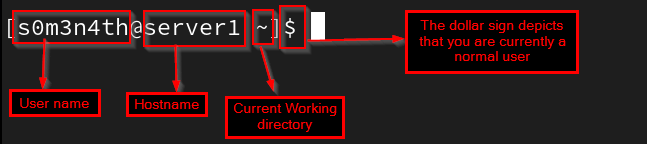
- For root user:
 server1 is the
 hostname.
Understanding the command mechanics:
Short option format:Where we can merge/depict two distinct commands in a shorter form to work altogether. We represent it withsingle hyphen.- For example:
ls -la(landaare 2 distinct options)
- For example:
Long option format:All letters in this representation are collectively identified as a single option. They also begin withdouble hyphens.- For example:
--all(It is an one option only)
- For example:
Example command structures:
| Commands | Definition |
|---|---|
| ls -l | One option, no explicit argument; the default argument is the current directory name |
| ls -al | Two options, no explicit argument; the default argument is the current directory name. |
| ls –all | One option, no explicit argument; the default argument is the current directory name |
| ls -l directory_name | One option, one explicit argument. |
| ls | No option, no explicit argument; the default argument is the current directory name |