For example, imagine you need to change a user’s password on their user account and there are over 100 devices in the network – this can be very challenging. Within Microsoft Windows Server, you will find many roles and features that can be installed and configured to help IT professionals provide many services and resources to everyone on a network. One such service within Microsoft Windows Server is known as Active Directory. This is a directory service that helps IT professionals centrally manage the users, groups, devices, and policies within the organization.
Active Directory stores information about objects on the network and makes this information easy for administrators and users to find and use. Active Directory uses a domain to manage a forest of domains, providing scalable, secure, and manageable infrastructure for user and resource management.
With Active Directory running on the network, devices will need to join the Windows domain that is managed by a domain controller. This allows individuals to log in to devices on the domain using their domain user account rather than a local user account stored on an isolated computer. Active Directory allows the following centralized management and security functions to be used:
- Management of user profiles on clients and servers on the domain.
- Management of network information and configurations.
- Centralized management of security policies for users, groups, and devices on the domain.
- Clients’ registry configurations and policies.
When setting up Active Directory on Microsoft Windows Server, you will need to create a forest that defines the logical security boundary for managing the users, groups, and devices of an organization. Within a forest, there can be many domains. A domain is a collection of Organizational Units (OUs) used to organize objects. A forest in Active Directory is essentially a collection of one or more domains that share a common configuration, schema, and global catalog. The term forest is commonly used to represent the highest level of an organization within Active Directory. It also defines both the administrative and security boundaries of an entire directory infrastructure.
The following are the default supported objects that can be placed within an OU on Active Directory:
- Users
- Computers
- Groups
- OUs
- Printers
- Shared folders
An OU is like creating a folder inside our computer and placing items(objects) that share a common factor, such as user accounts of people who work within the same department like CSE/IT/Management etc. This allows us to centrally manage the users, groups , computers etc.
A group allows you to assign user accounts to a group for easier security management, which means you can create a security policy using a GPO and assign that GPO to the group. Therefore, all users who are members of the group will be affected by the GPO. This is usually for creating and assigning security restrictions to users of a particular department or section within the organization.
A tree is when there are multiple domains within the same forest in AD. Trees help Domain Admins create logical security boundaries between each domain within the forest itself.
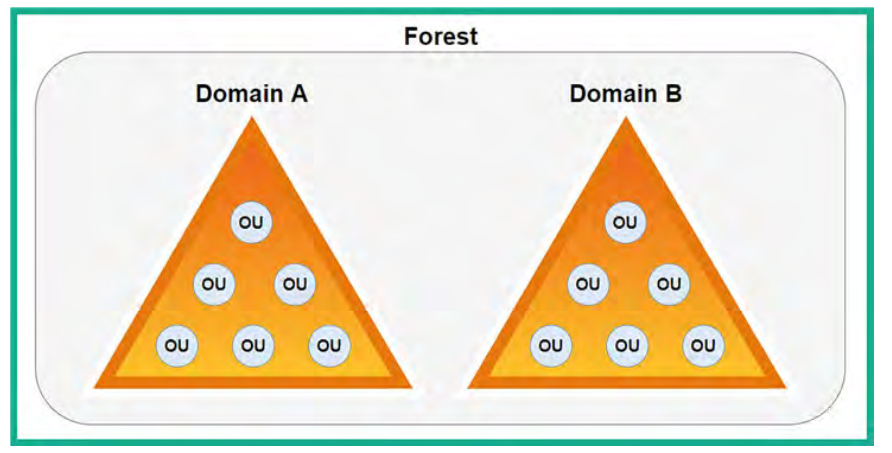 Multiple domains can exist within a single forest or multiple forests, which means that IT professionals can configure various types of trust within Active Directory. Implementing a trust model allows users from one domain or forest to access resources in another domain or forest. The concept of trust is especially important for large enterprise organizations.
TRUST MODELS INSIDE ACTIVE DIRECTORY:
- One way trust: Imagine that users within
Domain_Acan access the resources withinDomain_B, but users withinDomain_Bcannot access the resources withinDomain_A. - Two way trust: When using this trust model, users in both trusting and trusted domains can access resources within each other’s domain, so users within
Domain_Acan access the resources withinDomain_Band vice versa. - Transitive Trust: Extending trust - With transitive trust, trust can be extended from one domain to another domain within the same forest. So, transitive trust can be extended from
Domain_A to Domain_B, to Domain_C, and so on. By default, transitive trust between domains of the same forest is the same as two-way trust. - Non transitive trust: This type of trust does not extend to other domains within the same forest, but it can be either two-way trust or one-way trust. Remember that non-transitive trust is the default model between two different domains located in different forests, where the forests do not have a trust relationship.
- Forest trust: This type of trust is created between the forest root domain between different forests and can be either one-way trust or two-way trust, with transitive or non-transitive trust.
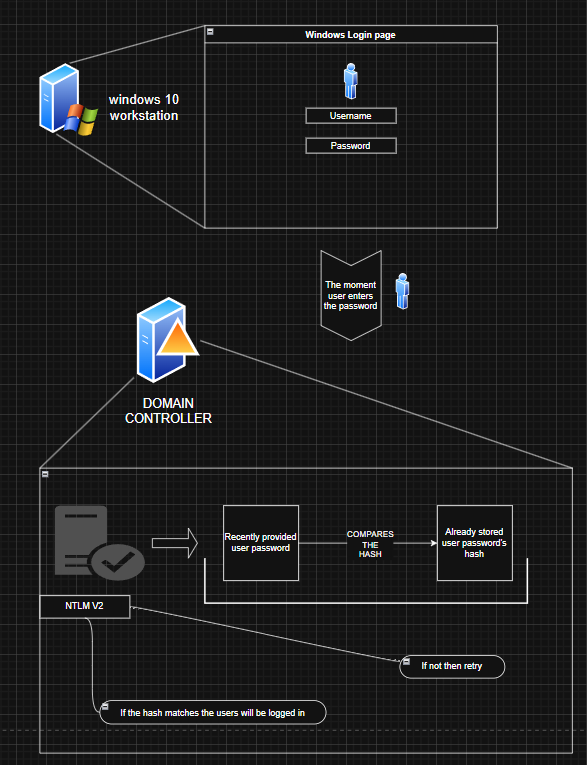
For penetration testers and ethical hackers, it is important to understand the domain login process. When a user attempts to log in to the domain, the following process occurs:
- The host sends the user’s domain username and the
New Technology LAN Manager (NTLM) version 2hash of the user’s password to the domain controller during the authentication process to validate the identity of the user (remember our pass-the-hash attacks?). - The domain controller determines whether the user credentials are valid.
- The domain controller responds to the host, by defining the security policies to apply to the user (network authentication). This means that a user with a valid domain user account can log in to any permitted device on the network, so long as the security policy permits that action.
When a local user account is created on a Windows 10/11 operating system, the user’s credentials are stored within the Security Account Manager (SAM) file located in the local machine’s C:\Windows\ System32\config directory. The username is stored in plaintext while the password is converted into an NTLM version 1 hash stored in the SAM file.
However, when a user is attempting to authenticate on a host within a domain, the host sends the domain username and NTLM version 2 password hash to the domain controller using the Lightweight Directory Access Protocol (LDAP) by default (an unsecure directory protocol used to perform queries on a directory server such as a domain controller over a network).